Writing /
Coding agents, the basics: Claude Code for healthcare professionals
How a coding agent like Claude Code works and how to keep it under control, told through one fictitious HbA1c report: rules, context, subagents, skills, privacy and which model to use.
A coding agent is a program that does not just answer: it reads your files, writes scripts, runs them and looks at the result, over and over, until the task is done. This tutorial explains how one works and how to keep it under control, for healthcare professionals who want to use one with their own data.
It follows the basic part of Anthropic’s Claude Code 101 course, with one case from start to finish: a quarterly HbA1c report built from twelve spreadsheets of lab results. The data are fictitious. Connecting external tools (MCP) and rules that are always enforced (hooks) are left for a second, deeper post.
Text of the slides
- TUTORIAL · CLAUDE CODE 101, THE BASICS · Coding agents:the basics · How an agent like Claude Code works and how to keep it under control, explained for healthcare professionals. · José Manuel Ramírez Sánchez · jmramirez.engineer · November 2026
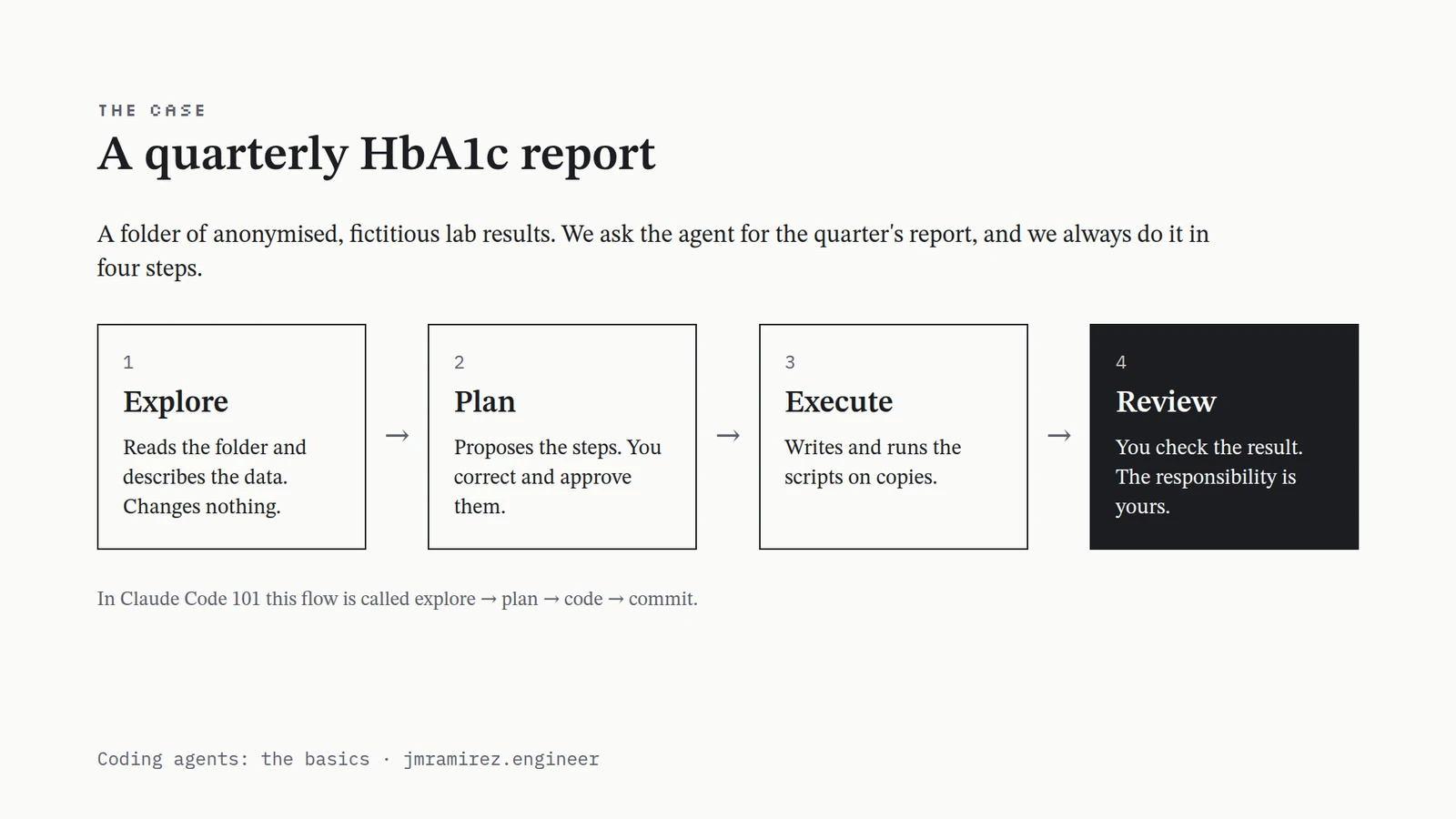
- THE CASE · A quarterly HbA1c report · A folder of anonymised, fictitious lab results. We ask the agent for the quarter's report, and we always do it in four steps. · 1 · Explore · Reads the folder and describes the data. Changes nothing. · → · 2 · Plan · Proposes the steps. You correct and approve them. · → · 3 · Execute · Writes and runs the scripts on copies. · → · 4 · Review · You check the result. The responsibility is yours. · In Claude Code 101 this flow is called explore → plan → code → commit. · Coding agents: the basics · jmramirez.engineer
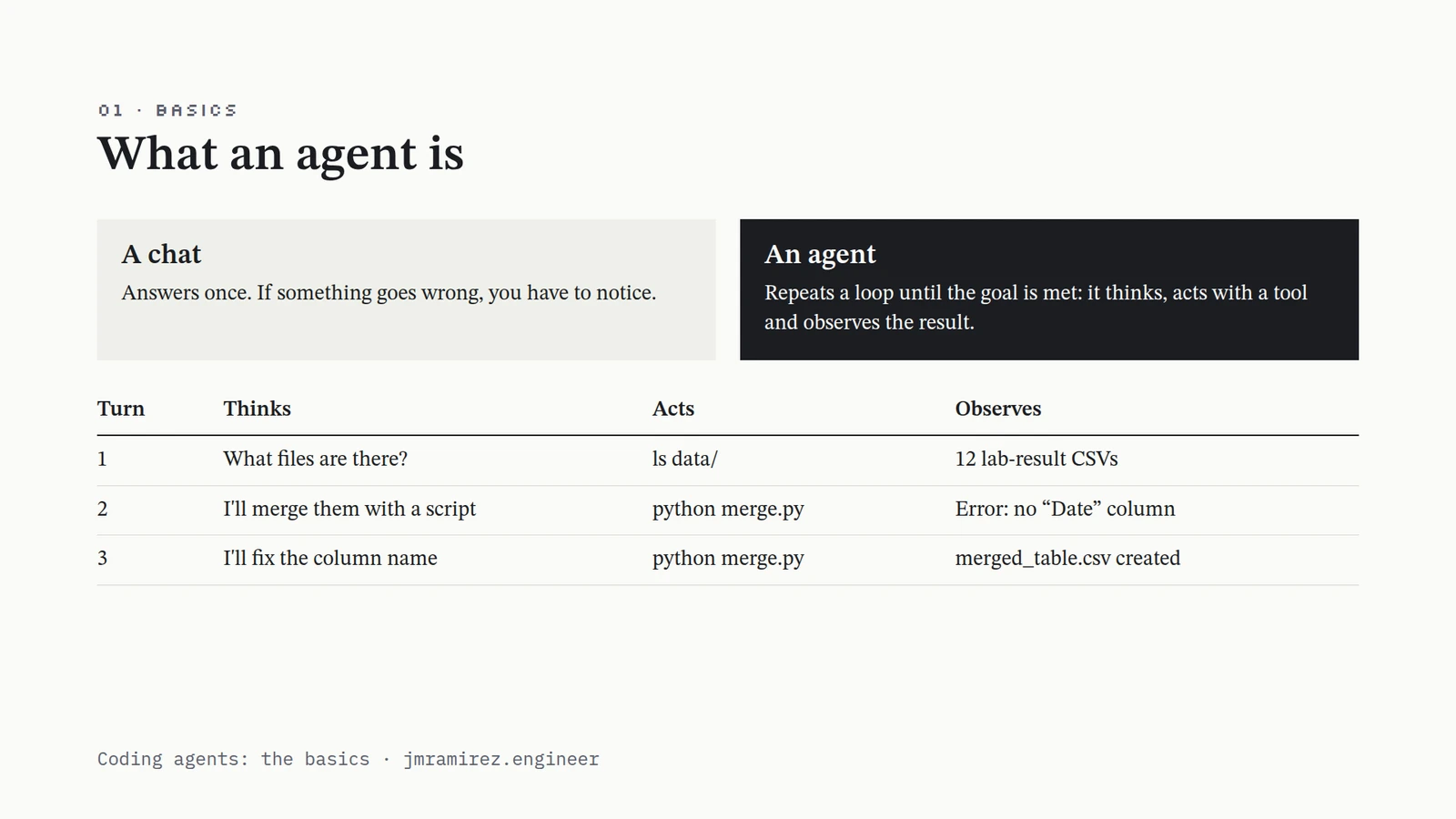
- 01 · BASICS · What an agent is · A chat · Answers once. If something goes wrong, you have to notice. · An agent · Repeats a loop until the goal is met: it thinks, acts with a tool and observes the result. · TurnThinksActsObserves 1What files are there?ls data/12 lab-result CSVs 2I'll merge them with a scriptpython merge.pyError: no “Date” column 3I'll fix the column namepython merge.pymerged_table.csv created Coding agents: the basics · jmramirez.engineer
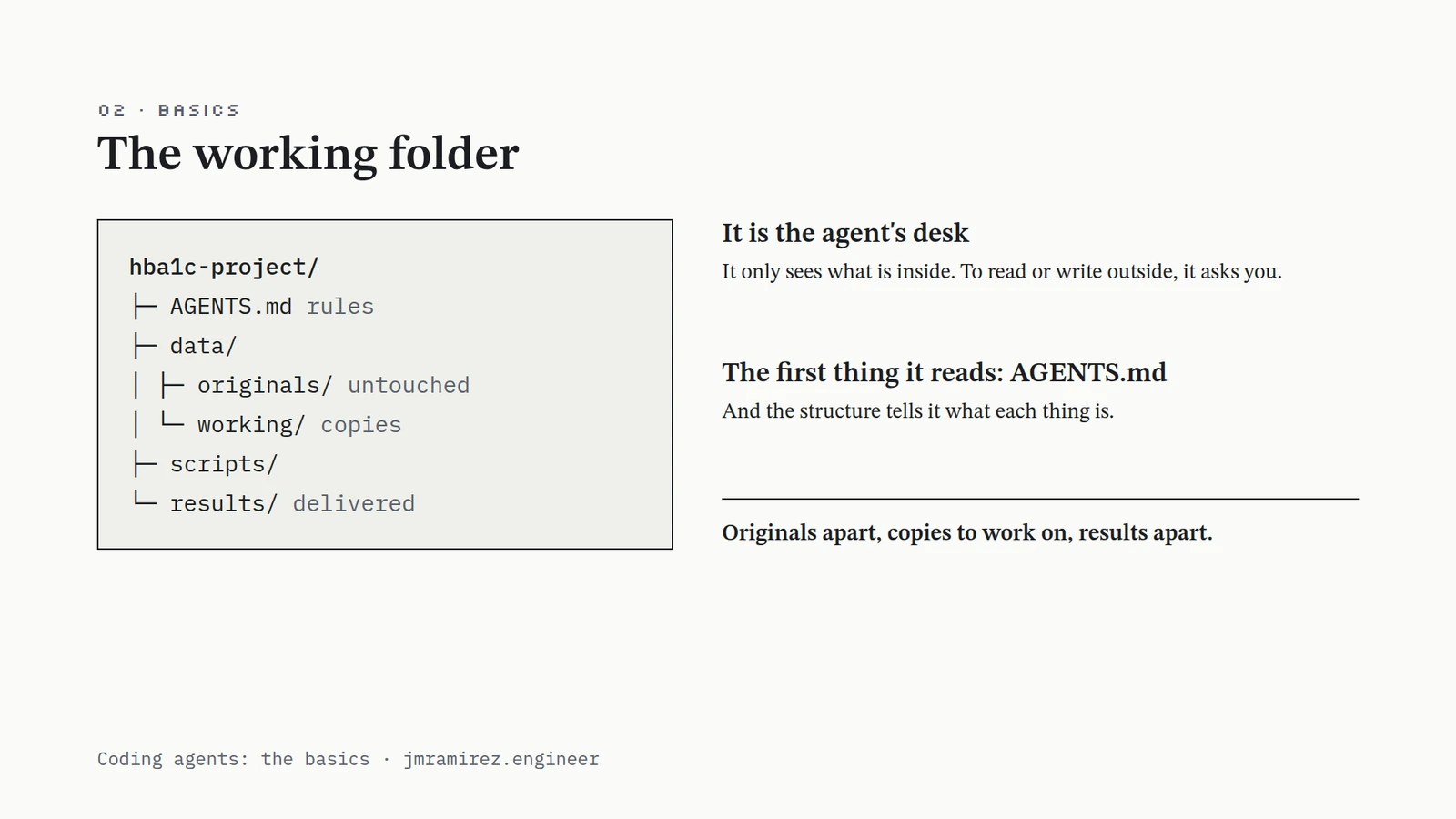
- 02 · BASICS · The working folder · hba1c-project/ · ├─ AGENTS.md rules · ├─ data/ · │ ├─ originals/ untouched · │ └─ working/ copies · ├─ scripts/ · └─ results/ delivered · It is the agent's desk · It only sees what is inside. To read or write outside, it asks you. · The first thing it reads: AGENTS.md · And the structure tells it what each thing is. · Originals apart, copies to work on, results apart. · Coding agents: the basics · jmramirez.engineer
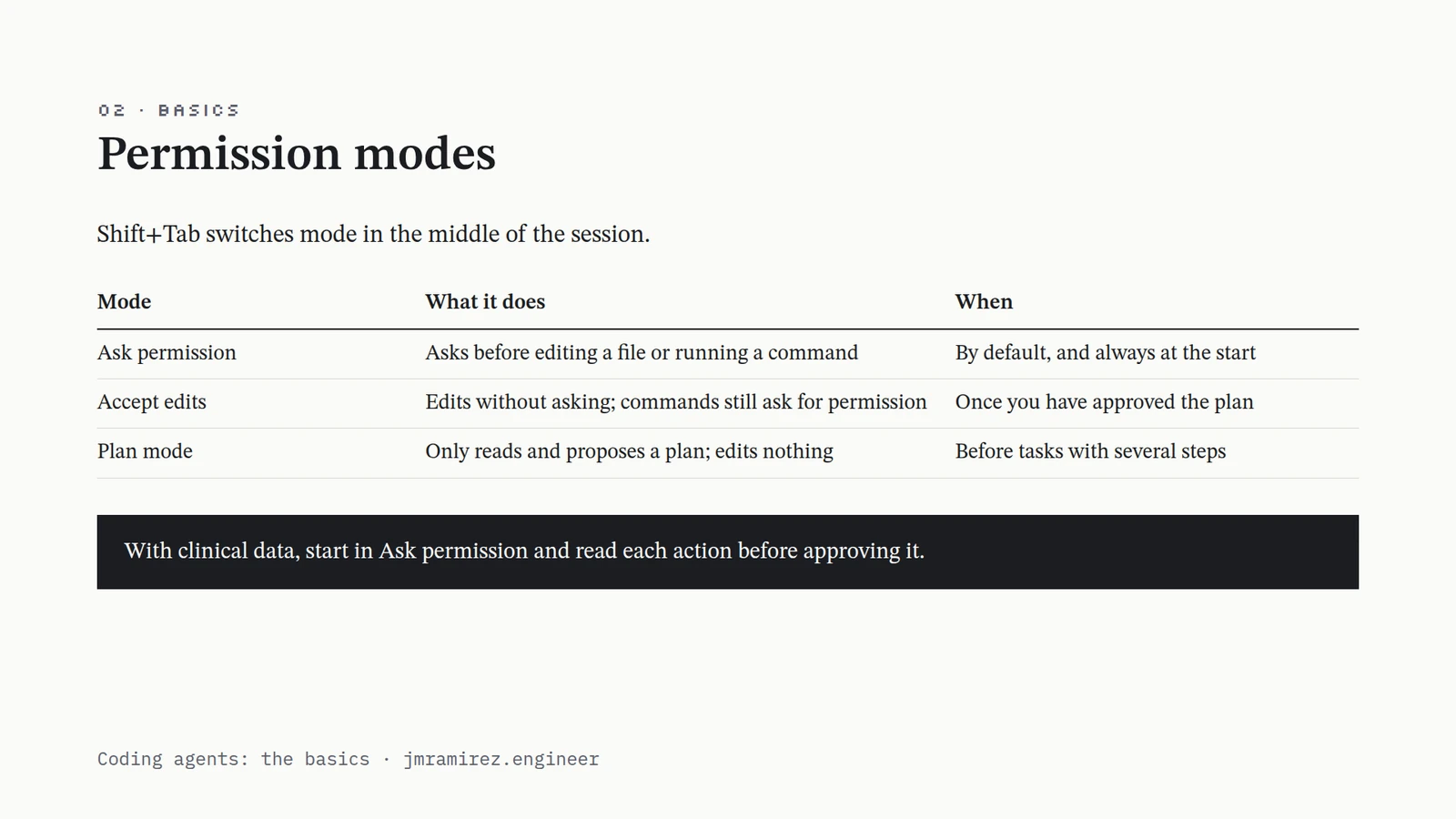
- 02 · BASICS · Permission modes · Shift+Tab switches mode in the middle of the session. · ModeWhat it doesWhen Ask permissionAsks before editing a file or running a commandBy default, and always at the start Accept editsEdits without asking; commands still ask for permissionOnce you have approved the plan Plan modeOnly reads and proposes a plan; edits nothingBefore tasks with several steps With clinical data, start in Ask permission and read each action before approving it. · Coding agents: the basics · jmramirez.engineer
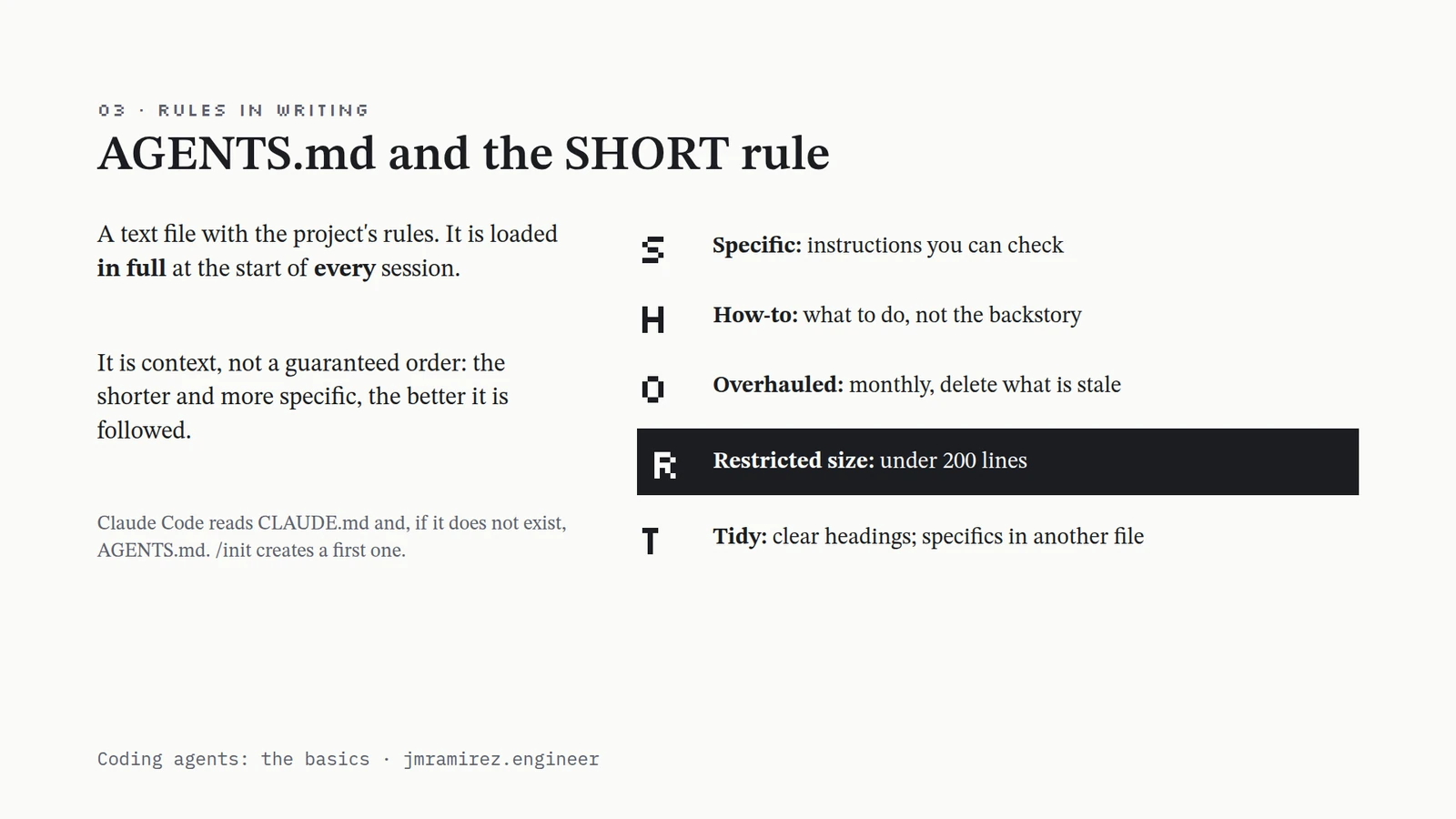
- 03 · RULES IN WRITING · AGENTS.md and the SHORT rule · A text file with the project's rules. It is loaded in full at the start of every session. · It is context, not a guaranteed order: the shorter and more specific, the better it is followed. · Claude Code reads CLAUDE.md and, if it does not exist, AGENTS.md. /init creates a first one. · S · Specific: instructions you can check · H · How-to: what to do, not the backstory · O · Overhauled: monthly, delete what is stale · R · Restricted size: under 200 lines · T · Tidy: clear headings; specifics in another file · Coding agents: the basics · jmramirez.engineer
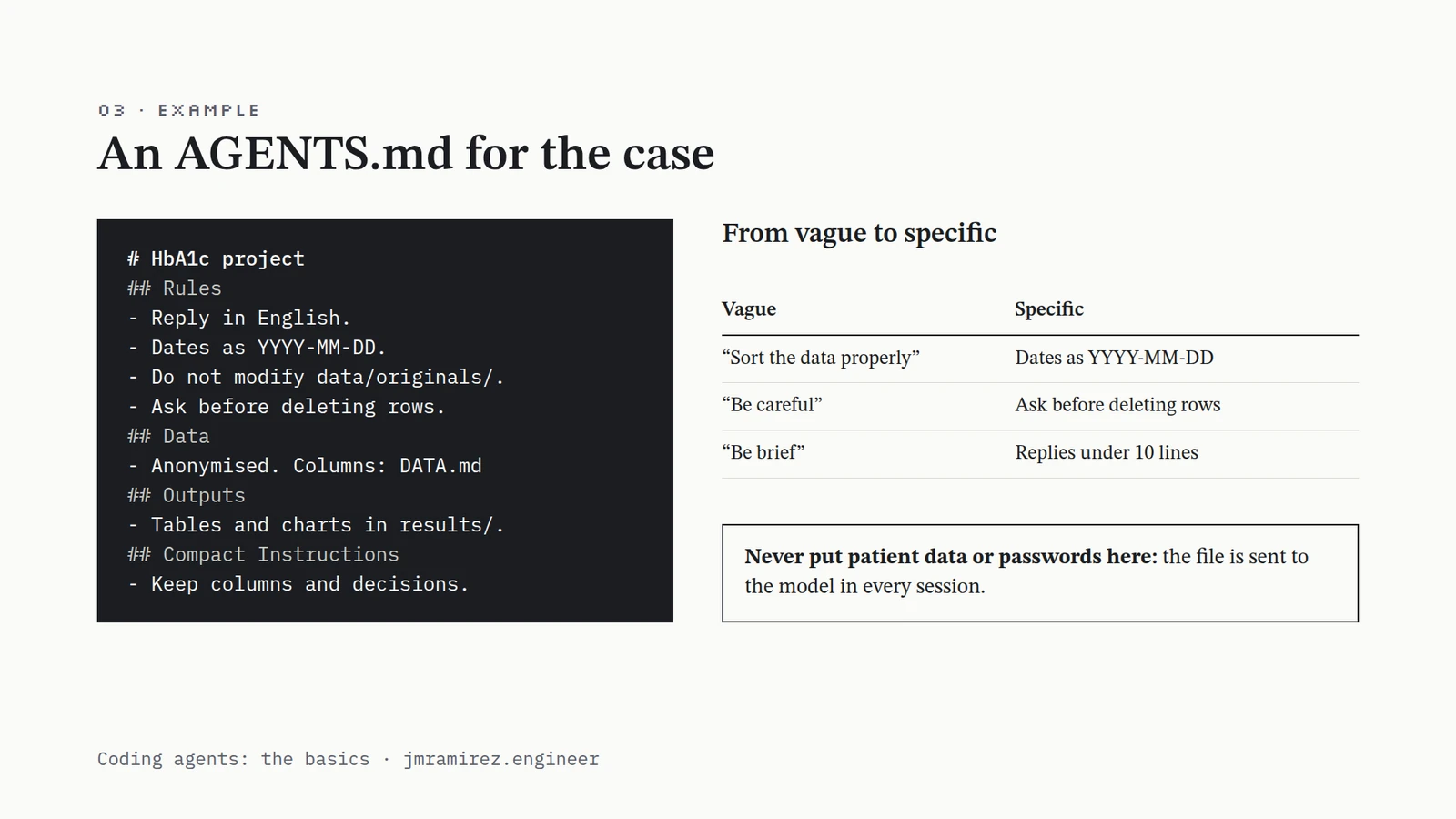
- 03 · EXAMPLE · An AGENTS.md for the case · # HbA1c project · ## Rules · - Reply in English. · - Dates as YYYY-MM-DD. · - Do not modify data/originals/. · - Ask before deleting rows. · ## Data · - Anonymised. Columns: DATA.md · ## Outputs · - Tables and charts in results/. · ## Compact Instructions · - Keep columns and decisions. · From vague to specific · VagueSpecific “Sort the data properly”Dates as YYYY-MM-DD “Be careful”Ask before deleting rows “Be brief”Replies under 10 lines Never put patient data or passwords here: the file is sent to the model in every session. · Coding agents: the basics · jmramirez.engineer
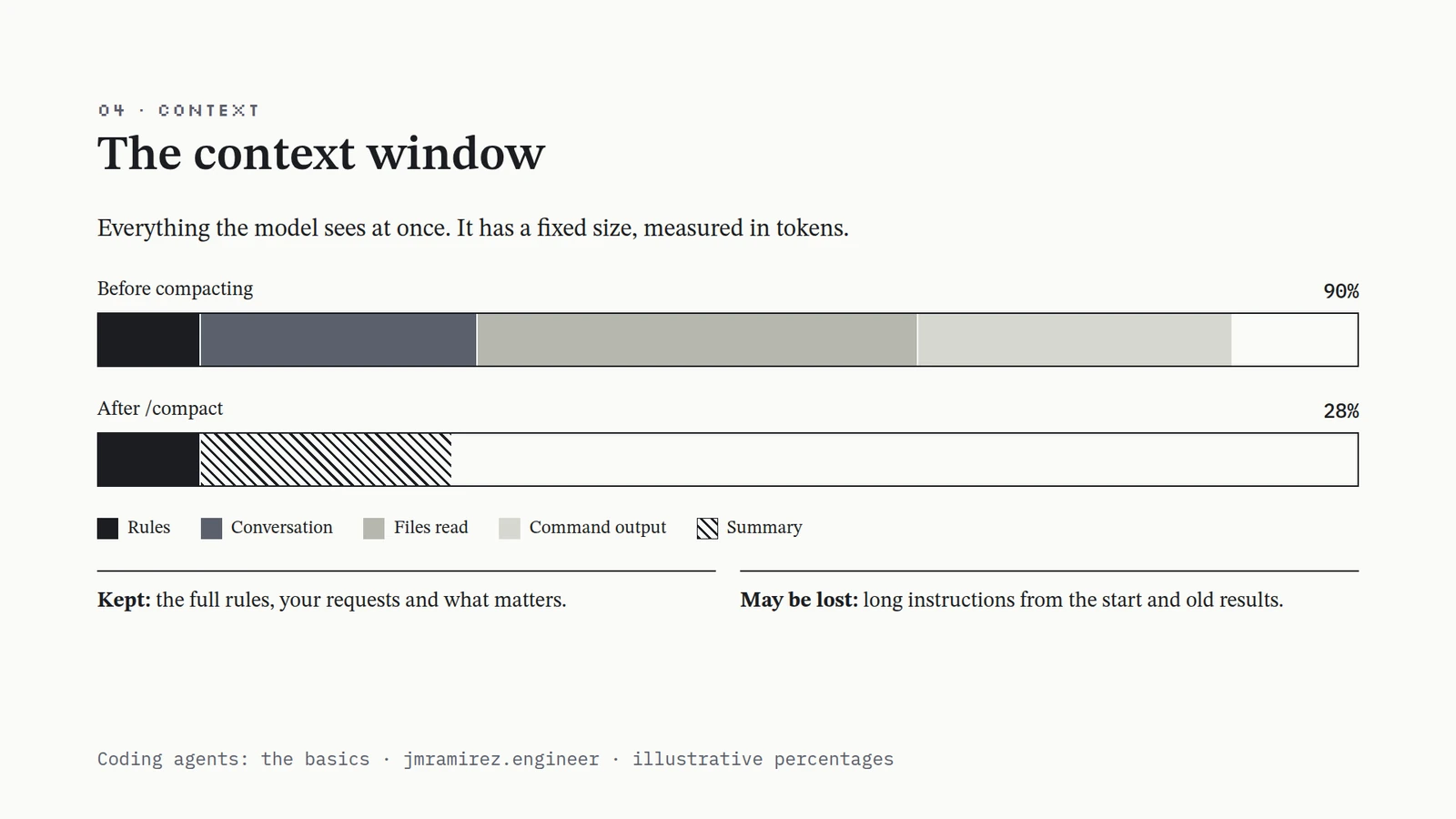
- 04 · CONTEXT · The context window · Everything the model sees at once. It has a fixed size, measured in tokens. · Before compacting · 90% · After /compact · 28% · Rules · Conversation · Files read · Command output · Summary · Kept: the full rules, your requests and what matters. · May be lost: long instructions from the start and old results. · Coding agents: the basics · jmramirez.engineer · illustrative percentages
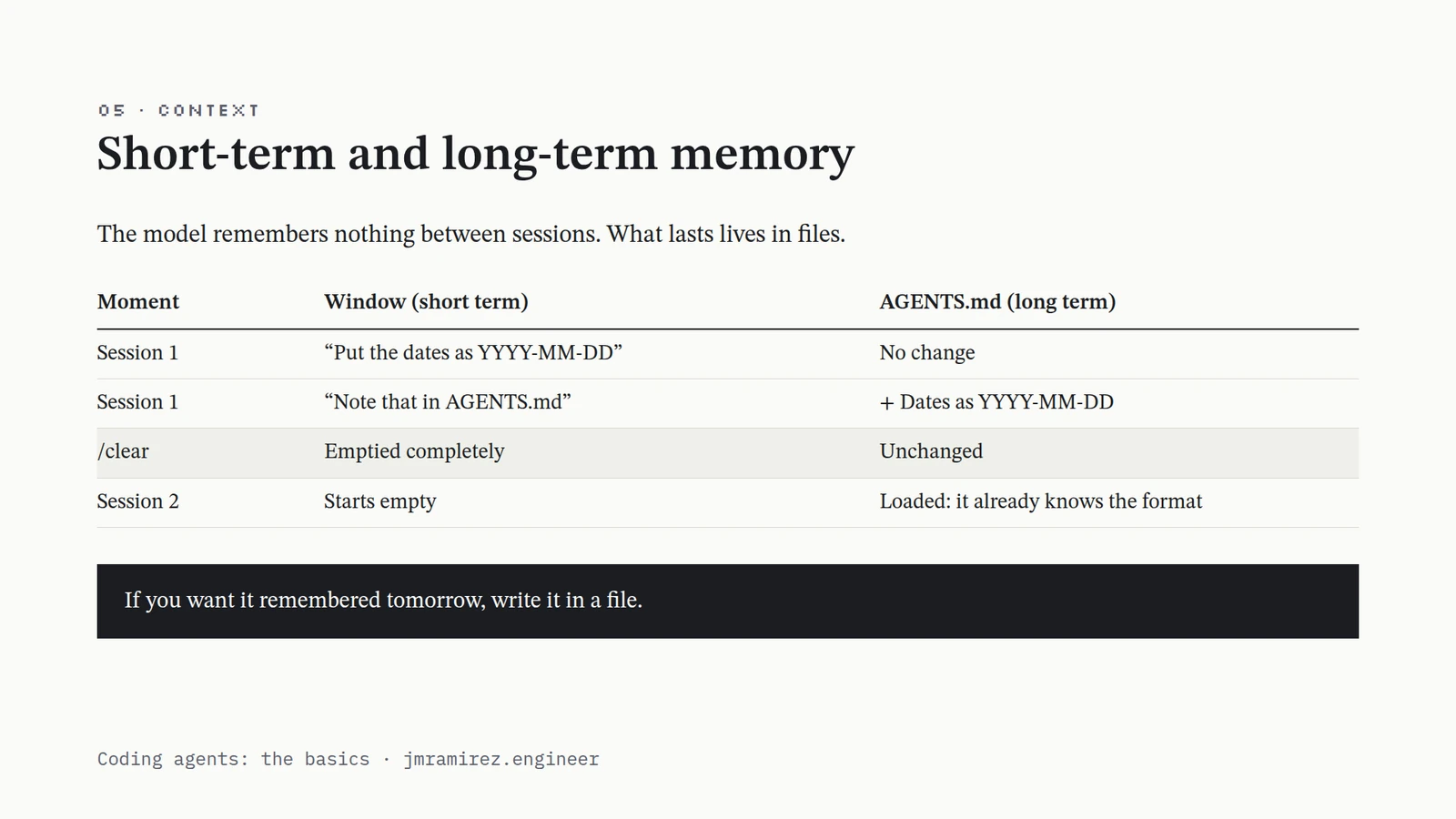
- 05 · CONTEXT · Short-term and long-term memory · The model remembers nothing between sessions. What lasts lives in files. · MomentWindow (short term)AGENTS.md (long term) Session 1“Put the dates as YYYY-MM-DD”No change Session 1“Note that in AGENTS.md”+ Dates as YYYY-MM-DD /clearEmptied completelyUnchanged Session 2Starts emptyLoaded: it already knows the format If you want it remembered tomorrow, write it in a file. · Coding agents: the basics · jmramirez.engineer
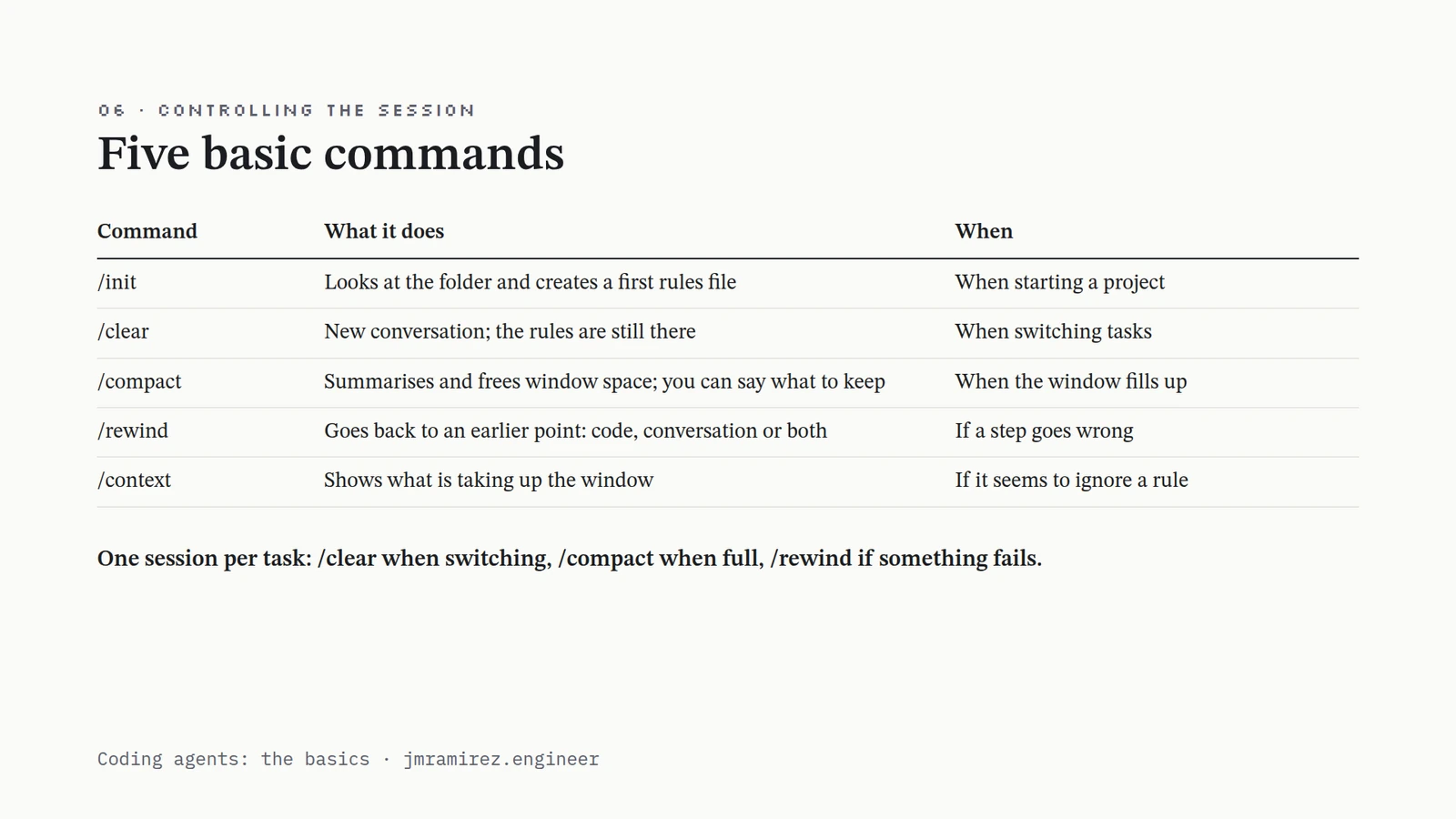
- 06 · CONTROLLING THE SESSION · Five basic commands · CommandWhat it doesWhen /initLooks at the folder and creates a first rules fileWhen starting a project /clearNew conversation; the rules are still thereWhen switching tasks /compactSummarises and frees window space; you can say what to keepWhen the window fills up /rewindGoes back to an earlier point: code, conversation or bothIf a step goes wrong /contextShows what is taking up the windowIf it seems to ignore a rule One session per task: /clear when switching, /compact when full, /rewind if something fails. · Coding agents: the basics · jmramirez.engineer
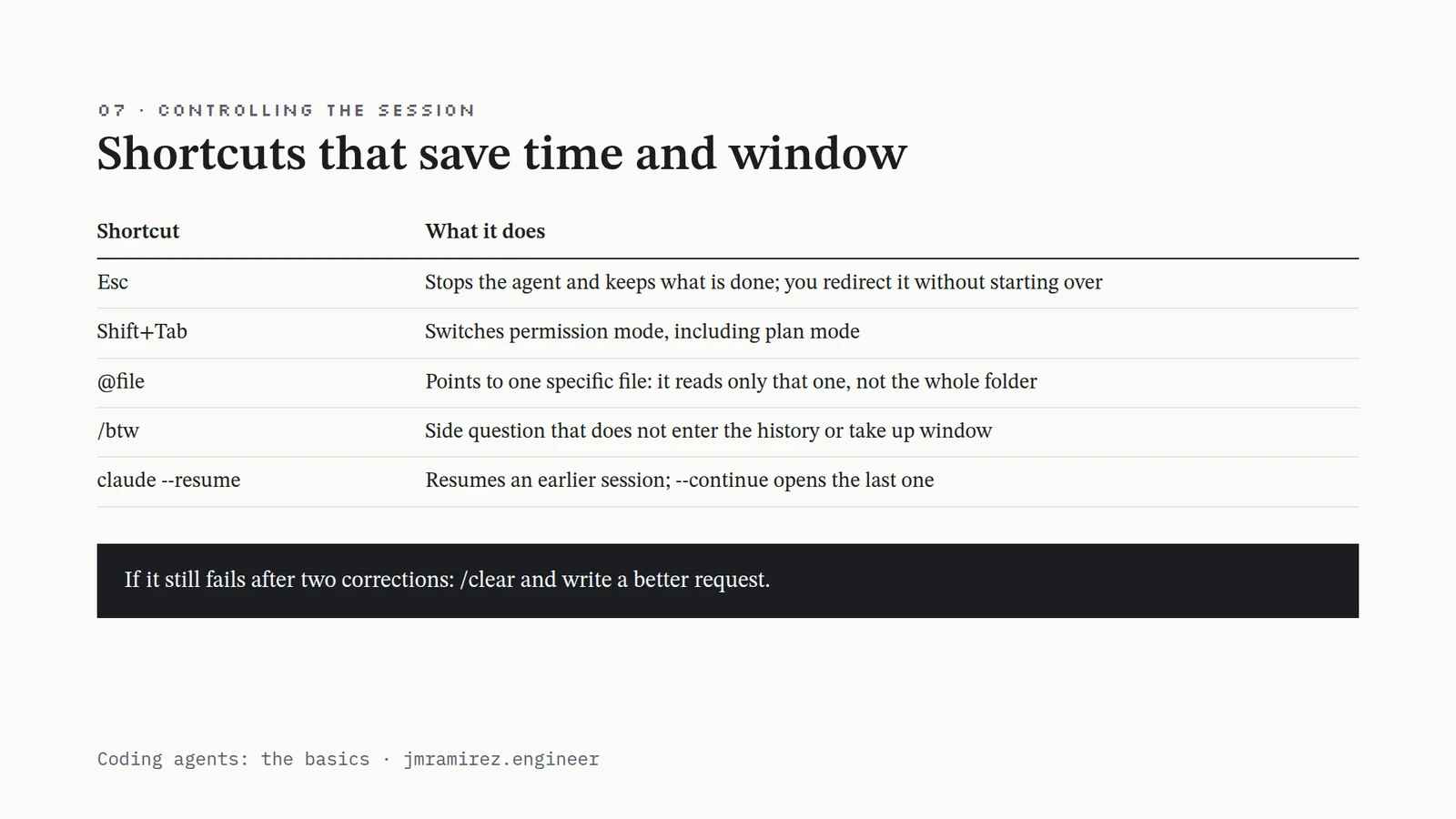
- 07 · CONTROLLING THE SESSION · Shortcuts that save time and window · ShortcutWhat it does EscStops the agent and keeps what is done; you redirect it without starting over Shift+TabSwitches permission mode, including plan mode @filePoints to one specific file: it reads only that one, not the whole folder /btwSide question that does not enter the history or take up window claude --resumeResumes an earlier session; --continue opens the last one If it still fails after two corrections: /clear and write a better request. · Coding agents: the basics · jmramirez.engineer
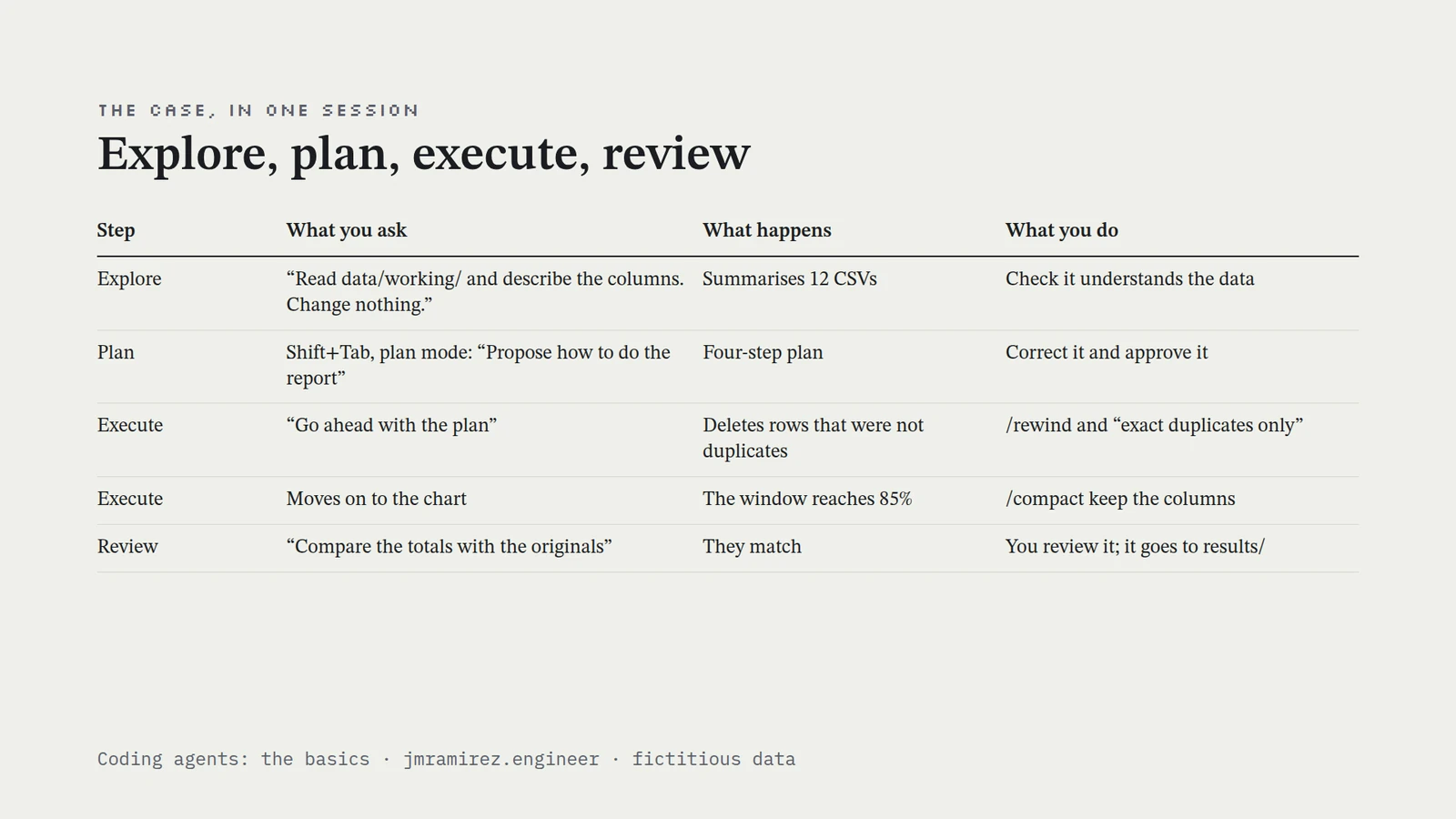
- THE CASE, IN ONE SESSION · Explore, plan, execute, review · StepWhat you askWhat happensWhat you do Explore“Read data/working/ and describe the columns. Change nothing.”Summarises 12 CSVsCheck it understands the data PlanShift+Tab, plan mode: “Propose how to do the report”Four-step planCorrect it and approve it Execute“Go ahead with the plan”Deletes rows that were not duplicates/rewind and “exact duplicates only” ExecuteMoves on to the chartThe window reaches 85%/compact keep the columns Review“Compare the totals with the originals”They matchYou review it; it goes to results/ Coding agents: the basics · jmramirez.engineer · fictitious data
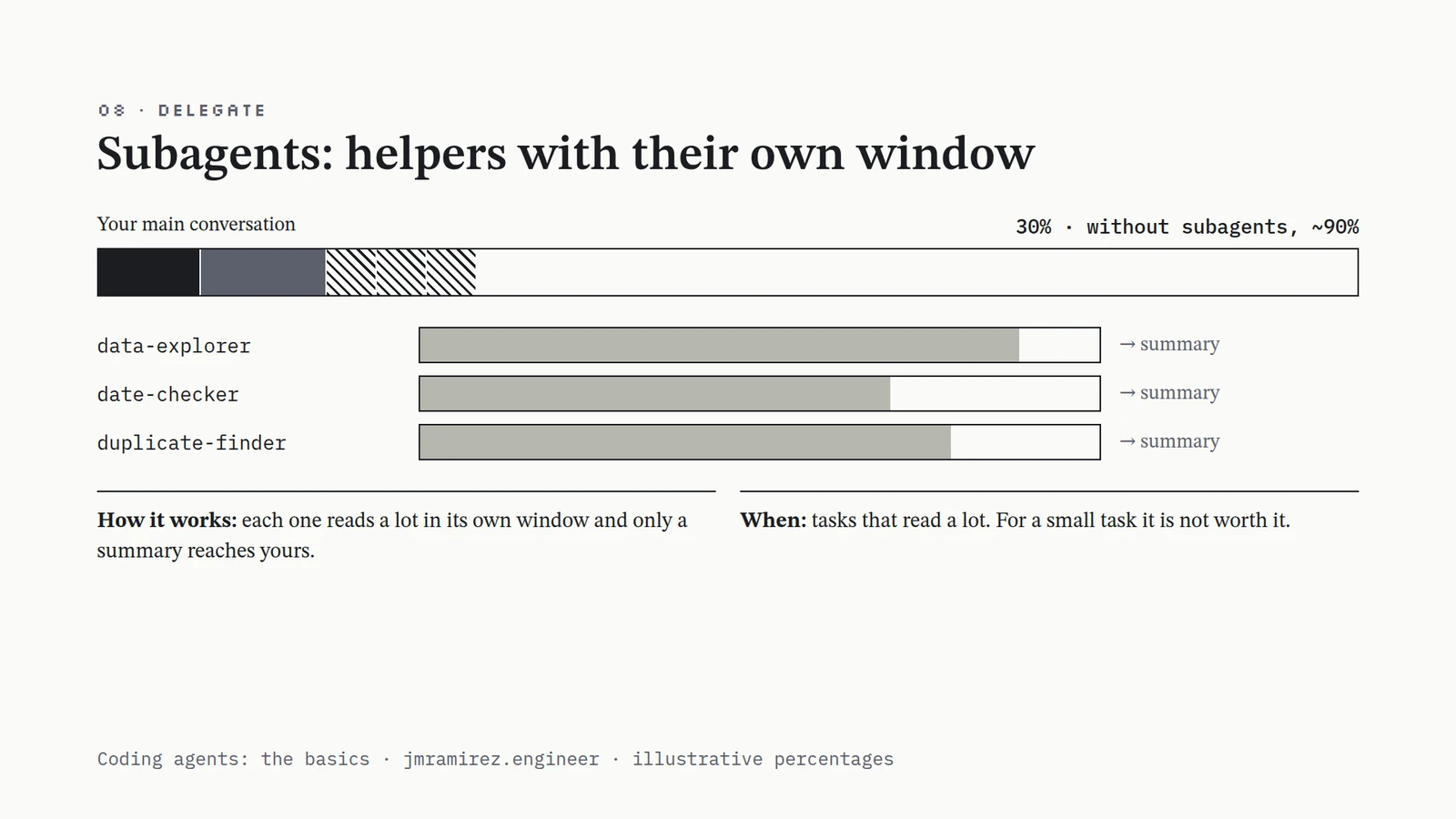
- 08 · DELEGATE · Subagents: helpers with their own window · Your main conversation · 30% · without subagents, ~90% · data-explorer · → summary · date-checker · → summary · duplicate-finder · → summary · How it works: each one reads a lot in its own window and only a summary reaches yours. · When: tasks that read a lot. For a small task it is not worth it. · Coding agents: the basics · jmramirez.engineer · illustrative percentages
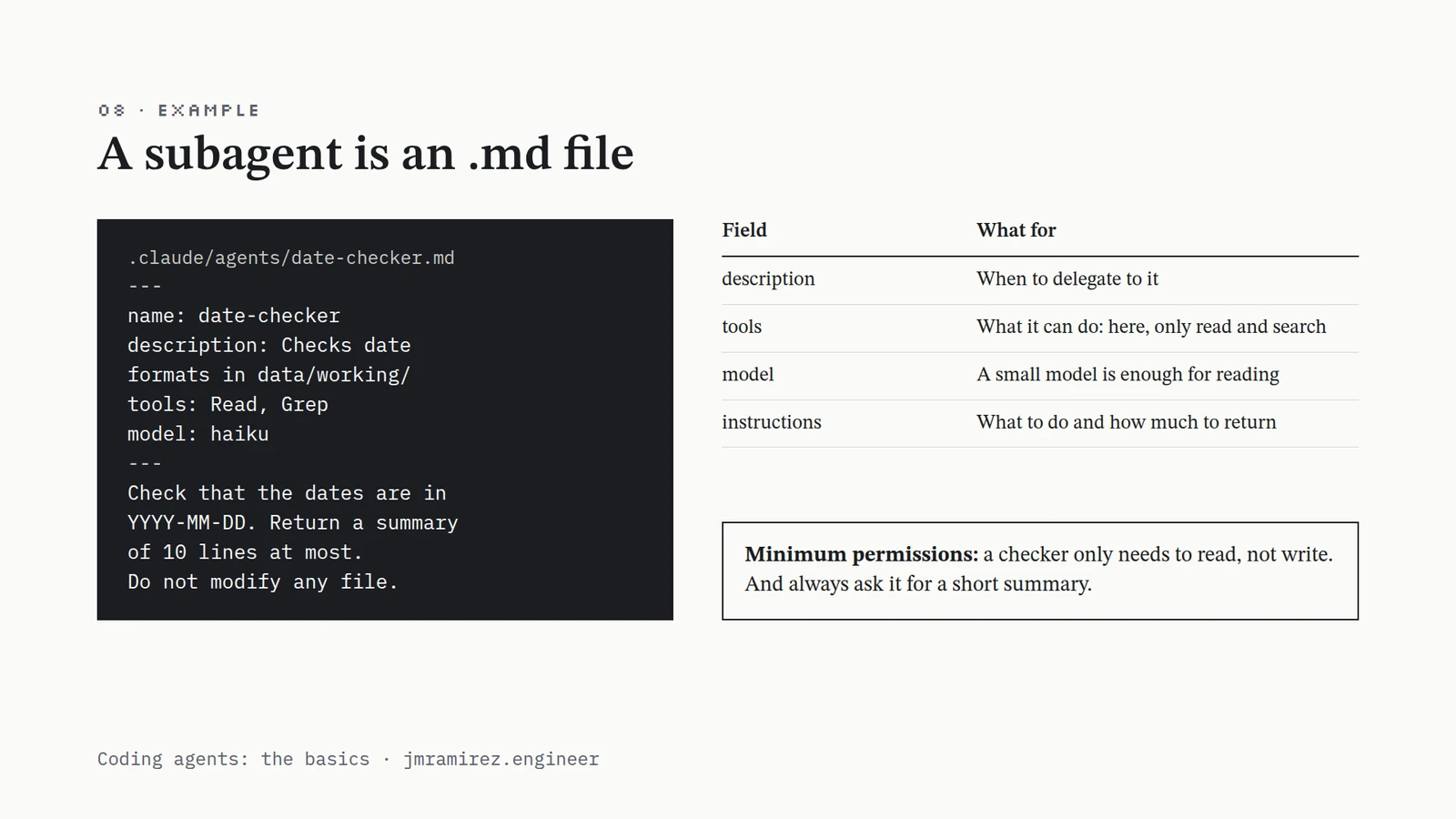
- 08 · EXAMPLE · A subagent is an .md file · .claude/agents/date-checker.md · --- · name: date-checker · description: Checks date · formats in data/working/ · tools: Read, Grep · model: haiku · --- · Check that the dates are in · YYYY-MM-DD. Return a summary · of 10 lines at most. · Do not modify any file. · FieldWhat for descriptionWhen to delegate to it toolsWhat it can do: here, only read and search modelA small model is enough for reading instructionsWhat to do and how much to return Minimum permissions: a checker only needs to read, not write. And always ask it for a short summary. · Coding agents: the basics · jmramirez.engineer
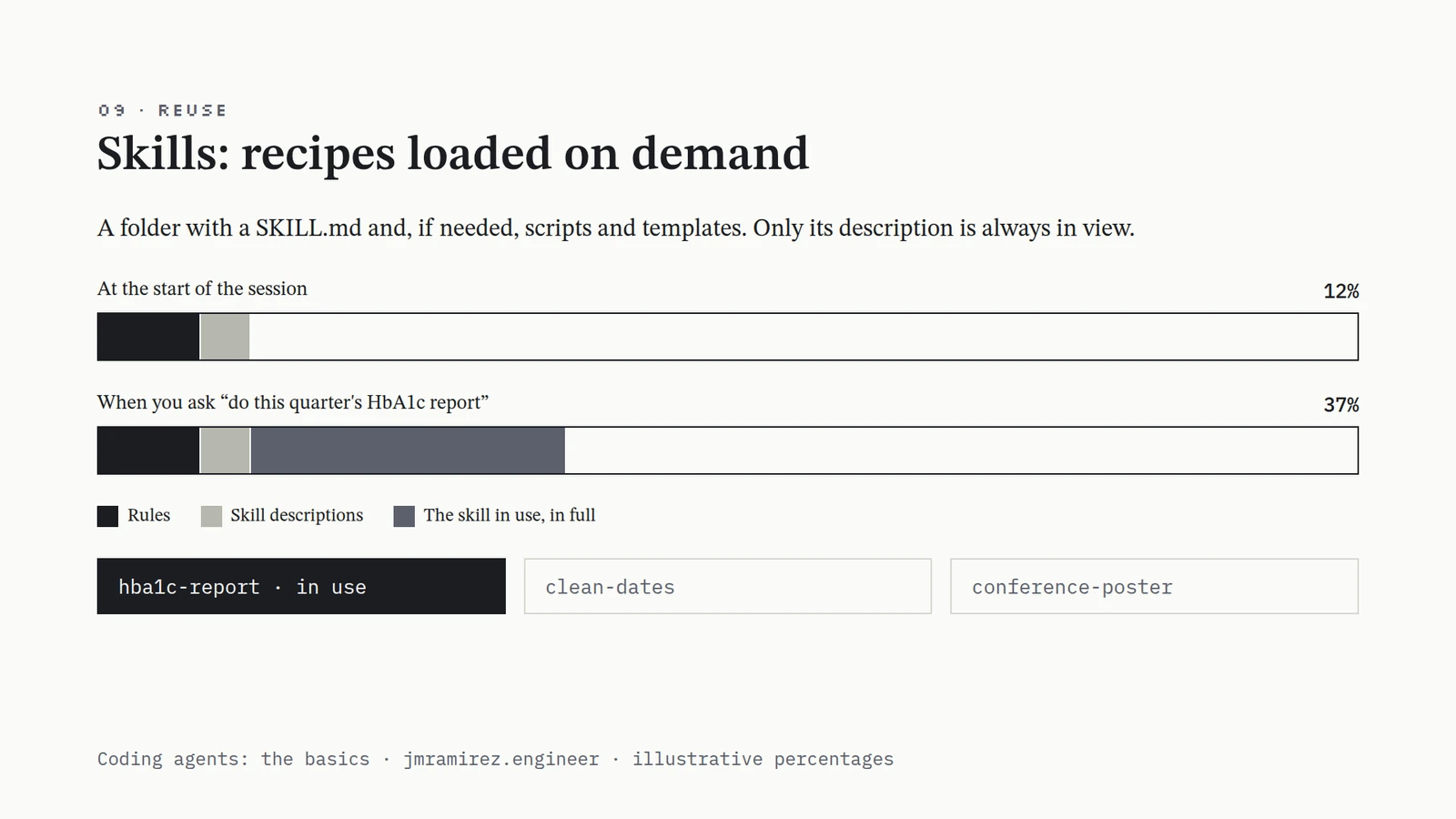
- 09 · REUSE · Skills: recipes loaded on demand · A folder with a SKILL.md and, if needed, scripts and templates. Only its description is always in view. · At the start of the session · 12% · When you ask “do this quarter's HbA1c report” · 37% · Rules · Skill descriptions · The skill in use, in full · hba1c-report · in use · clean-dates · conference-poster · Coding agents: the basics · jmramirez.engineer · illustrative percentages
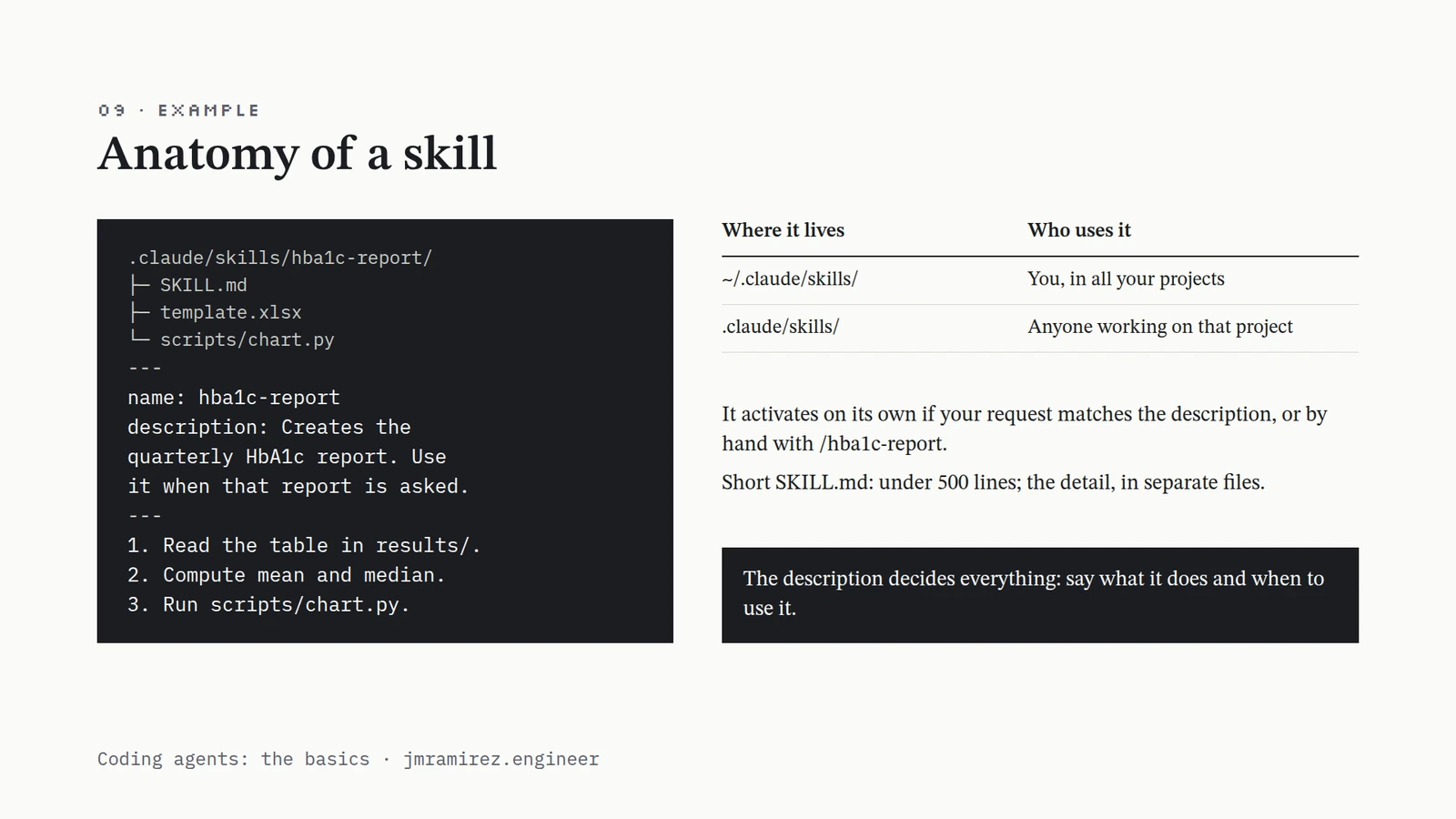
- 09 · EXAMPLE · Anatomy of a skill · .claude/skills/hba1c-report/ · ├─ SKILL.md · ├─ template.xlsx · └─ scripts/chart.py · --- · name: hba1c-report · description: Creates the · quarterly HbA1c report. Use · it when that report is asked. · --- · 1. Read the table in results/. · 2. Compute mean and median. · 3. Run scripts/chart.py. · Where it livesWho uses it ~/.claude/skills/You, in all your projects .claude/skills/Anyone working on that project It activates on its own if your request matches the description, or by hand with /hba1c-report. · Short SKILL.md: under 500 lines; the detail, in separate files. · The description decides everything: say what it does and when to use it. · Coding agents: the basics · jmramirez.engineer
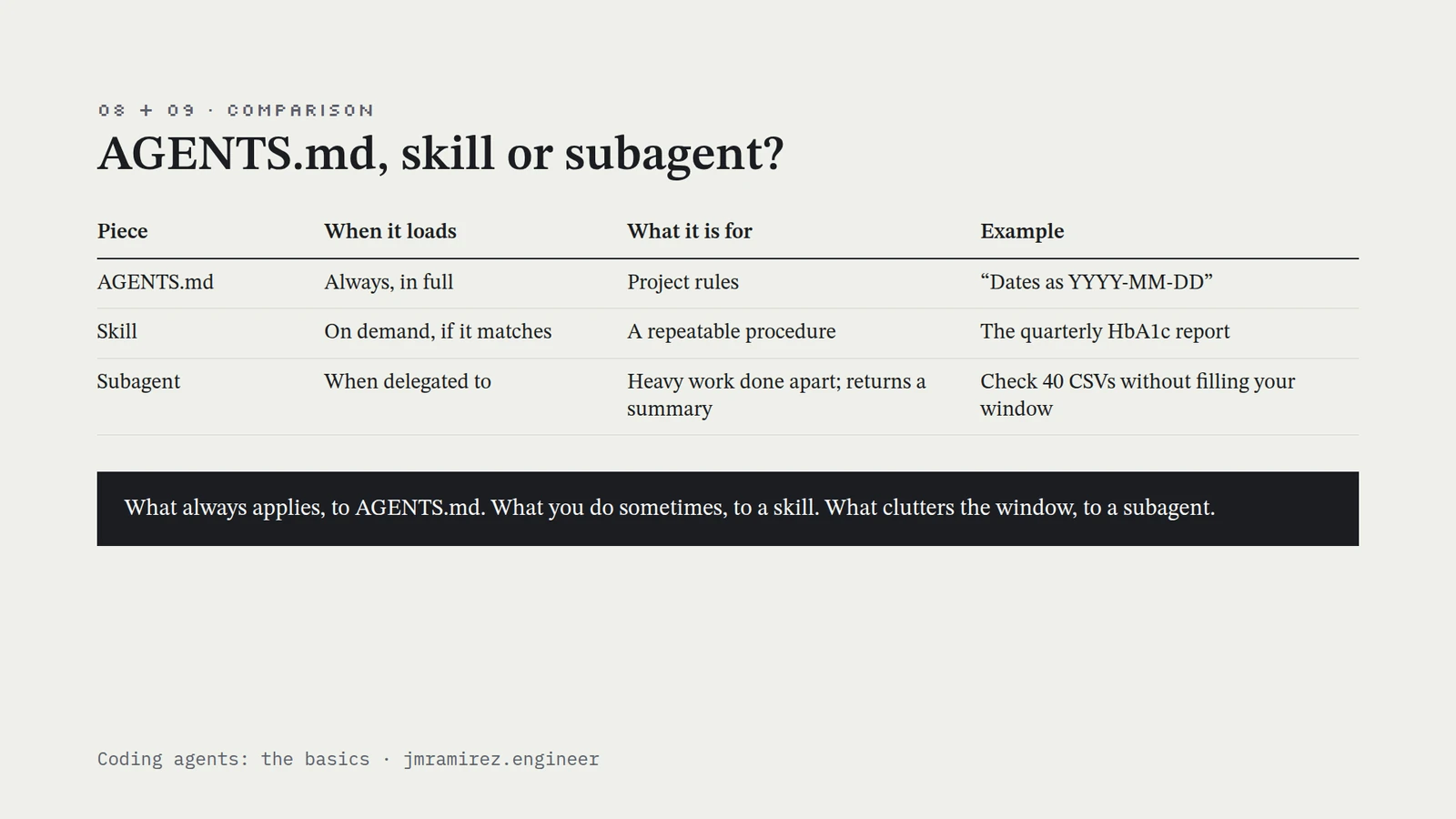
- 08 + 09 · COMPARISON · AGENTS.md, skill or subagent? · PieceWhen it loadsWhat it is forExample AGENTS.mdAlways, in fullProject rules“Dates as YYYY-MM-DD” SkillOn demand, if it matchesA repeatable procedureThe quarterly HbA1c report SubagentWhen delegated toHeavy work done apart; returns a summaryCheck 40 CSVs without filling your window What always applies, to AGENTS.md. What you do sometimes, to a skill. What clutters the window, to a subagent. · Coding agents: the basics · jmramirez.engineer
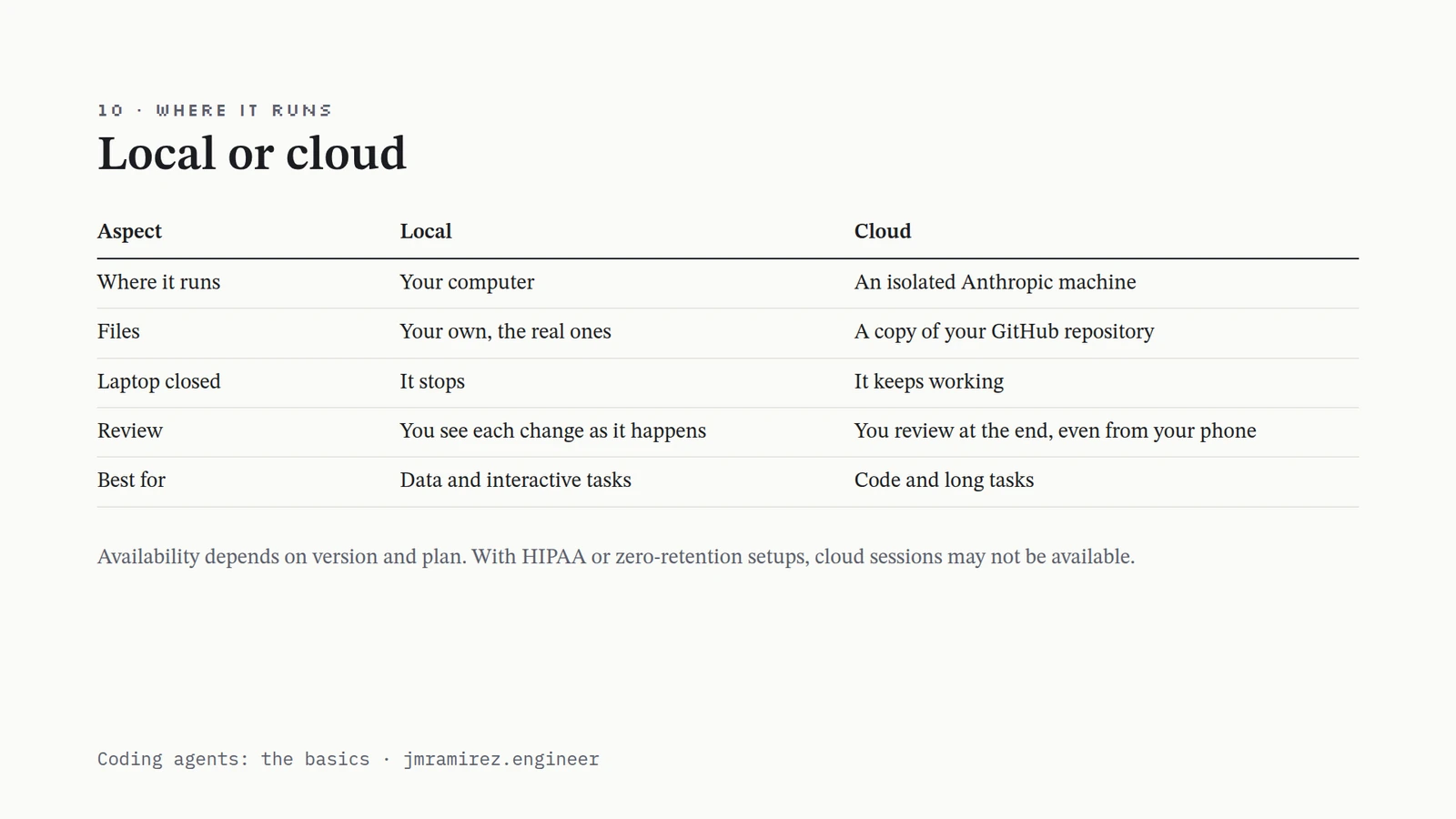
- 10 · WHERE IT RUNS · Local or cloud · AspectLocalCloud Where it runsYour computerAn isolated Anthropic machine FilesYour own, the real onesA copy of your GitHub repository Laptop closedIt stopsIt keeps working ReviewYou see each change as it happensYou review at the end, even from your phone Best forData and interactive tasksCode and long tasks Availability depends on version and plan. With HIPAA or zero-retention setups, cloud sessions may not be available. · Coding agents: the basics · jmramirez.engineer
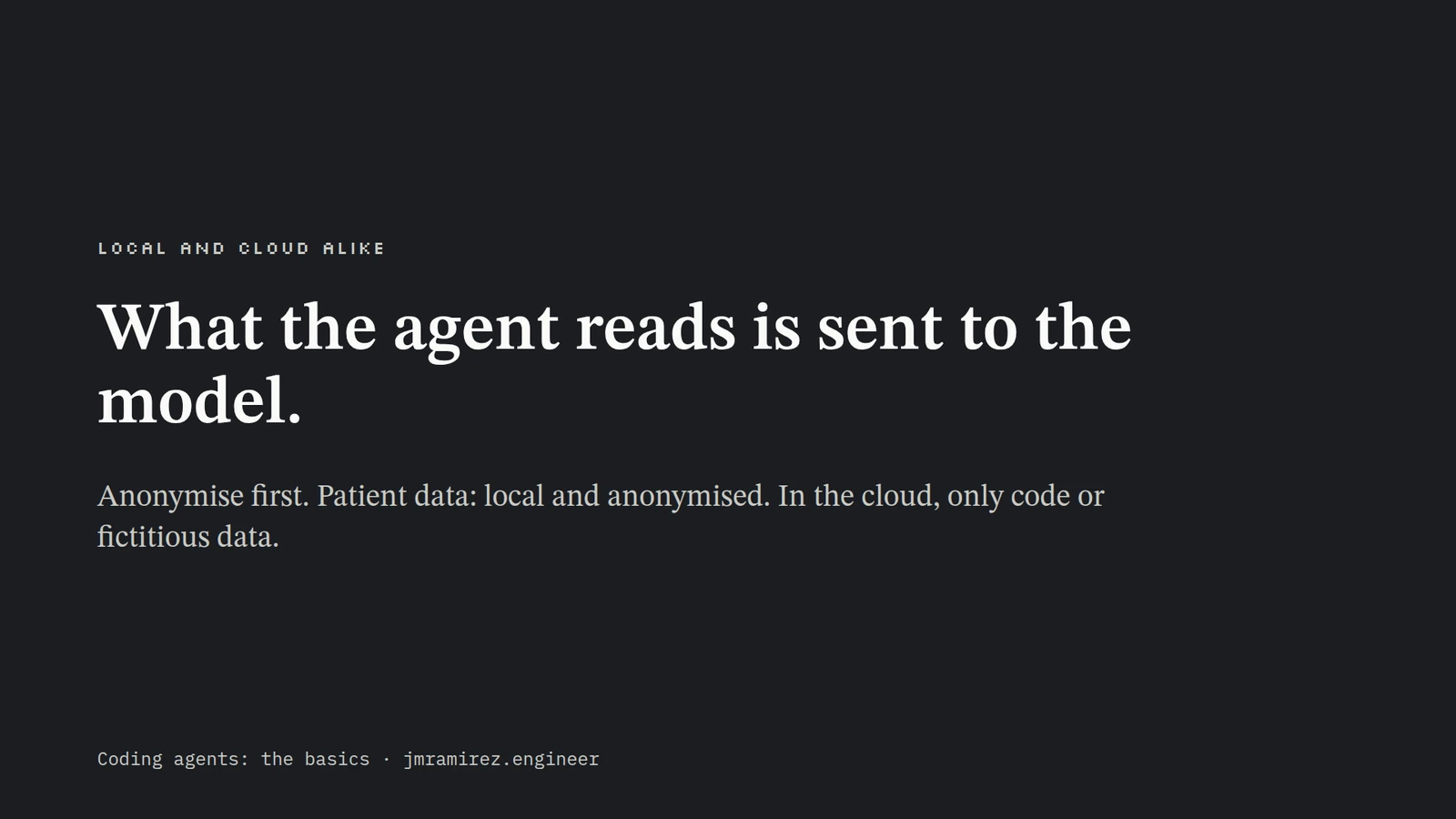
- LOCAL AND CLOUD ALIKE · What the agent reads is sent to the model. · Anonymise first. Patient data: local and anonymised. In the cloud, only code or fictitious data. · Coding agents: the basics · jmramirez.engineer
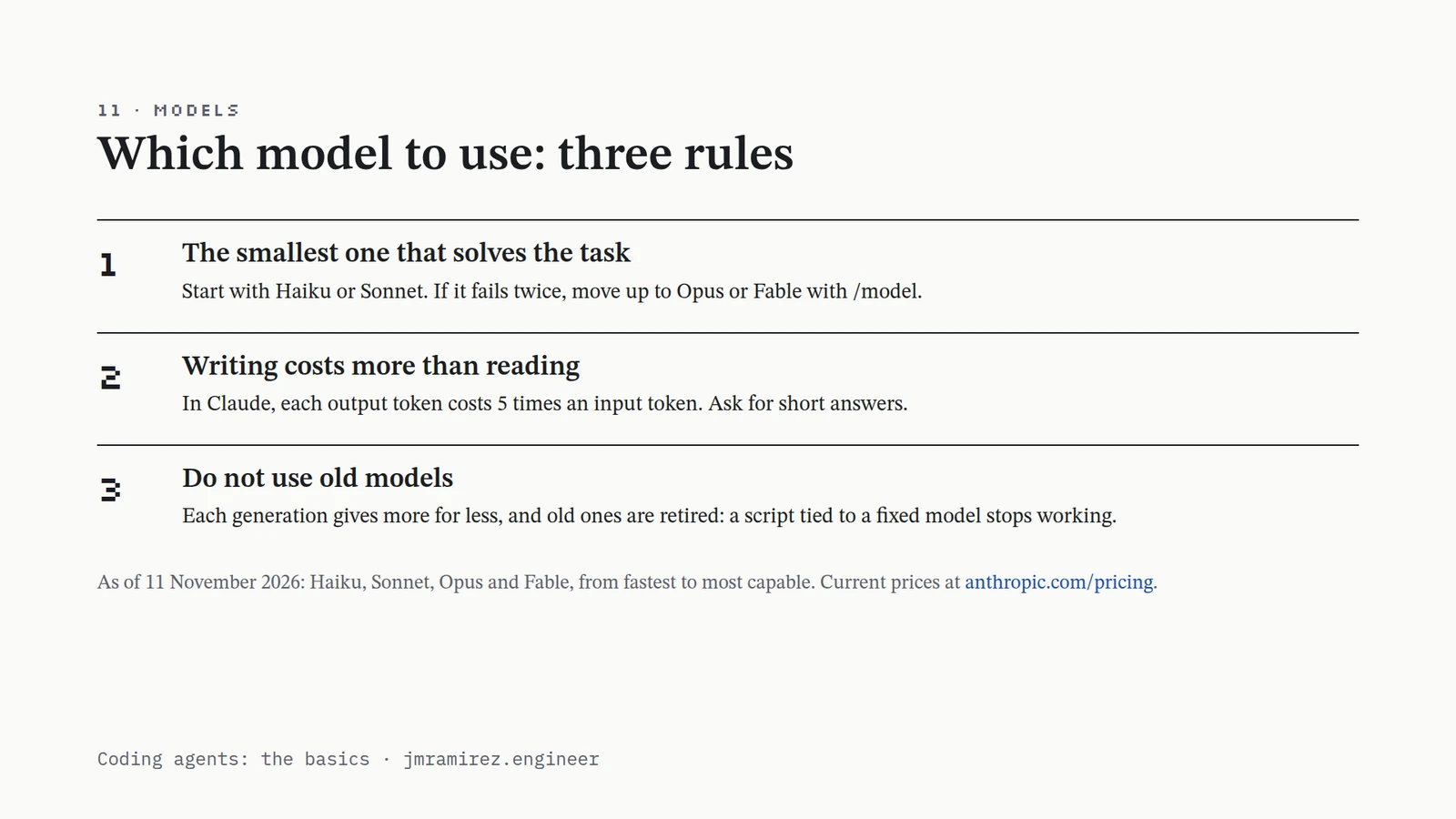
- 11 · MODELS · Which model to use: three rules · 1 · The smallest one that solves the task · Start with Haiku or Sonnet. If it fails twice, move up to Opus or Fable with /model. · 2 · Writing costs more than reading · In Claude, each output token costs 5 times an input token. Ask for short answers. · 3 · Do not use old models · Each generation gives more for less, and old ones are retired: a script tied to a fixed model stops working. · As of 11 November 2026: Haiku, Sonnet, Opus and Fable, from fastest to most capable. Current prices at anthropic.com/pricing. · Coding agents: the basics · jmramirez.engineer
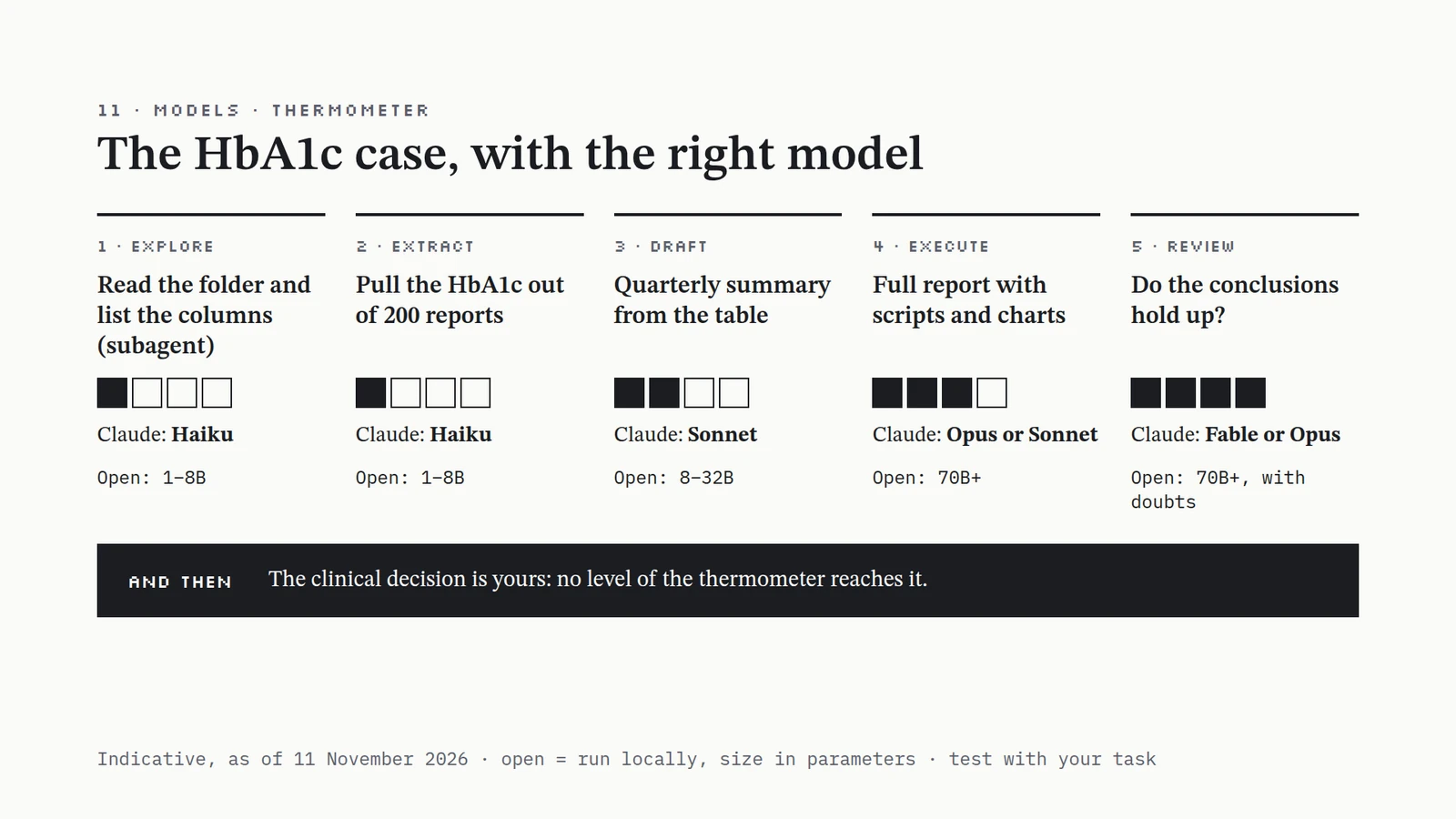
- 11 · MODELS · THERMOMETER · The HbA1c case, with the right model · 1 · EXPLORE · Read the folder and list the columns (subagent) · Claude: Haiku · Open: 1–8B · 2 · EXTRACT · Pull the HbA1c out of 200 reports · Claude: Haiku · Open: 1–8B · 3 · DRAFT · Quarterly summary from the table · Claude: Sonnet · Open: 8–32B · 4 · EXECUTE · Full report with scripts and charts · Claude: Opus or Sonnet · Open: 70B+ · 5 · REVIEW · Do the conclusions hold up? · Claude: Fable or Opus · Open: 70B+, with doubts · AND THEN · The clinical decision is yours: no level of the thermometer reaches it. · Indicative, as of 11 November 2026 · open = run locally, size in parameters · test with your task
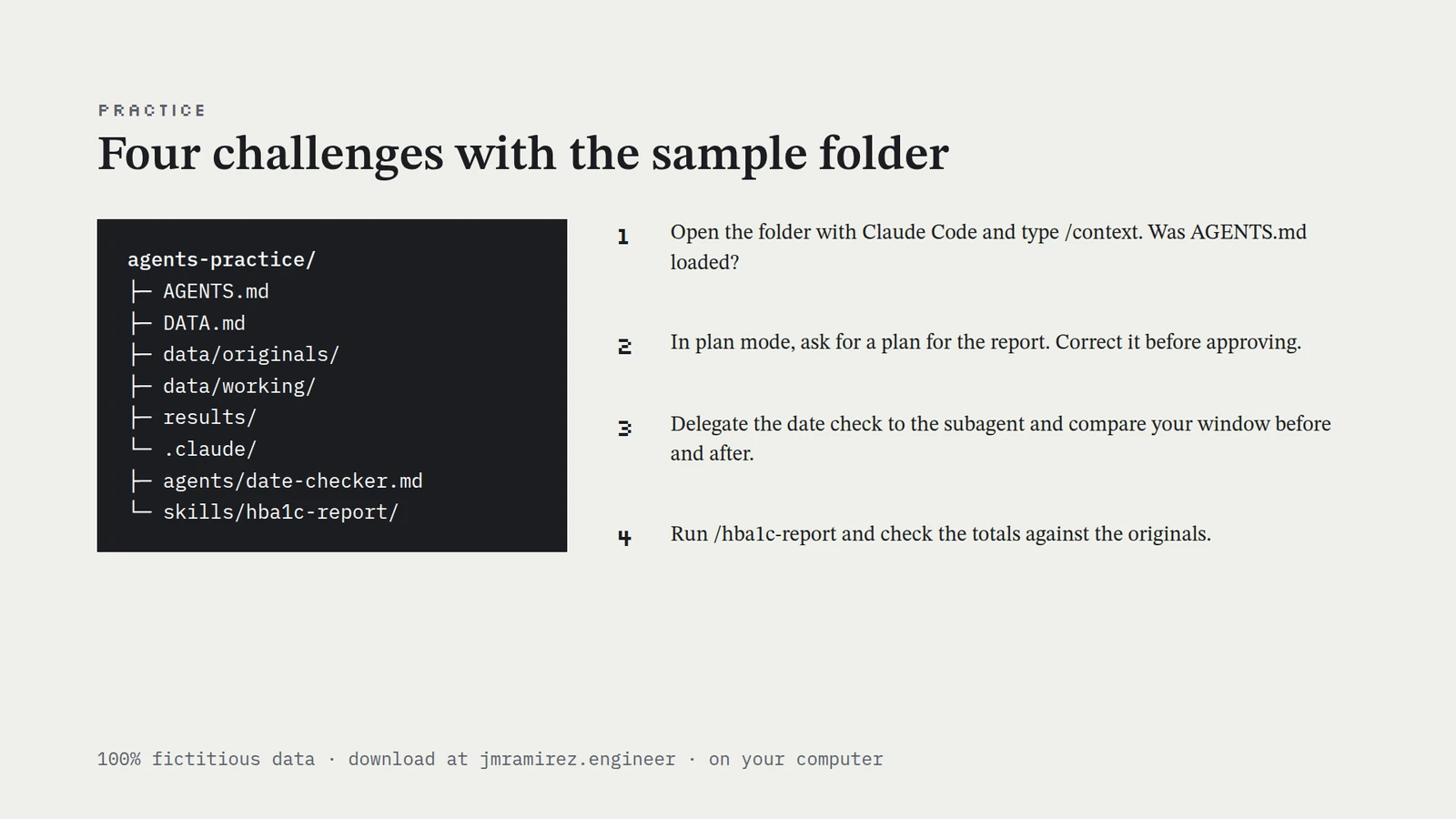
- PRACTICE · Four challenges with the sample folder · agents-practice/ · ├─ AGENTS.md · ├─ DATA.md · ├─ data/originals/ · ├─ data/working/ · ├─ results/ · └─ .claude/ · ├─ agents/date-checker.md · └─ skills/hba1c-report/ · 1 · Open the folder with Claude Code and type /context. Was AGENTS.md loaded? · 2 · In plan mode, ask for a plan for the report. Correct it before approving. · 3 · Delegate the date check to the subagent and compare your window before and after. · 4 · Run /hba1c-report and check the totals against the originals. · 100% fictitious data · download at jmramirez.engineer · on your computer
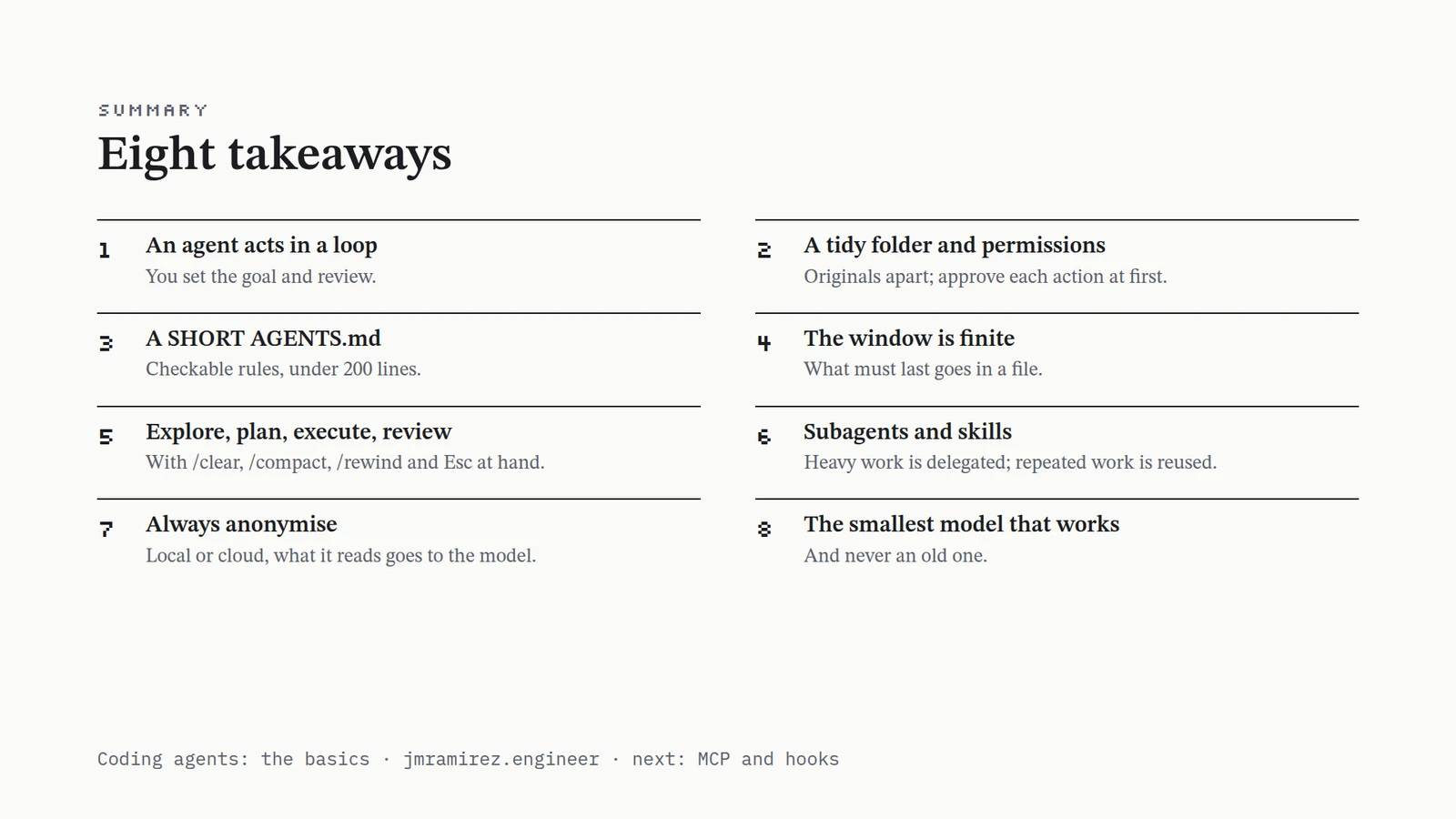
- SUMMARY · Eight takeaways · 1 · An agent acts in a loop · You set the goal and review. · 2 · A tidy folder and permissions · Originals apart; approve each action at first. · 3 · A SHORT AGENTS.md · Checkable rules, under 200 lines. · 4 · The window is finite · What must last goes in a file. · 5 · Explore, plan, execute, review · With /clear, /compact, /rewind and Esc at hand. · 6 · Subagents and skills · Heavy work is delegated; repeated work is reused. · 7 · Always anonymise · Local or cloud, what it reads goes to the model. · 8 · The smallest model that works · And never an old one. · Coding agents: the basics · jmramirez.engineer · next: MCP and hooks
You can practise everything here with the sample folder (12 KB, fictitious data) on your own computer. The challenges are at the end.
1. What an agent is
A chat answers once: if something goes wrong, you have to notice. An agent repeats a loop until the goal is met. It thinks what to do, acts with a tool (lists a folder, runs a script) and observes the result. If the script fails because a column is called sample_date instead of date, the agent reads the error and fixes it on the next turn.
That autonomy is what makes it useful, and what makes a method necessary. Every task in this tutorial follows the same four steps:
- Explore. It reads the folder and describes the data. It changes nothing.
- Plan. It proposes the steps. You correct them and approve them.
- Execute. It writes and runs the scripts, always on copies.
- Review. You check the result. The responsibility is yours.
2. A tidy folder and permissions
The agent works inside one folder, its desk: it only sees what is inside, and asks before reading or writing outside. Keep the originals apart, copies to work on, and results apart:
hba1c-project/
├─ AGENTS.md          rules
├─ data/
│  ├─ originals/      untouched
│  └─ working/        copies
├─ scripts/
└─ results/           delivered
Claude Code has three permission modes, switched with Shift+Tab: ask permission before editing a file or running a command (the default), accept edits, and plan mode, where it only reads and proposes. With clinical data, start in ask permission and read each action before approving it.
3. The rules, in writing: AGENTS.md
The agent remembers nothing between sessions. What it has to know every time goes in a text file at the root of the project, loaded in full at the start of each session. Claude Code reads CLAUDE.md and, if there is none, AGENTS.md, the name other agents use too; /init writes a first version.
# HbA1c project
## Rules
- Reply in English.
- Dates as YYYY-MM-DD.
- Do not modify data/originals/.
- Ask before deleting rows.
## Data
- Anonymised. Columns: DATA.md
## Outputs
- Tables and charts in results/.
## Compact Instructions
- Keep columns and decisions.
It is context, not a guaranteed order, so it has to be SHORT: Specific (rules you can check: “dates as YYYY-MM-DD”, not “sort the data properly”), How-to (what to do, not the backstory), Overhauled (delete what is stale every month), Restricted in size (under 200 lines) and Tidy (clear headings; the detail in other files, like DATA.md).
Never put patient data or passwords in it: the file is sent to the model in every session.
4. The context window
The window is everything the model sees at once: the rules, the conversation, the files it has read and the output of its commands. It has a fixed size, measured in tokens. Your messages take the least space; files and long outputs fill it.
Near the limit the conversation is compacted: summarised to make room. You can ask for it with /compact keep the columns, or the agent does it by itself. AGENTS.md survives whole; long instructions given at the start of the chat may be lost. So the rule is simple: if you want it remembered tomorrow, write it in a file. /context shows what is taking up the window.
5. Controlling the session
Five commands cover almost everything:
| Command | What it does | When |
|---|---|---|
/init | Looks at the folder and creates a first rules file | When starting a project |
/clear | New conversation; the rules are still there | When switching tasks |
/compact | Summarises and frees space; you can say what to keep | When the window fills up |
/rewind | Goes back to an earlier point: code, conversation or both | If a step goes wrong |
/context | Shows what is taking up the window | If it seems to ignore a rule |
Esc stops the agent without losing what is done, and @file points to one file so it does not read the whole folder. If it still fails after two corrections, /clear and write a better request.
This is the whole case in one session:
| Step | What you ask | What happens | What you do |
|---|---|---|---|
| Explore | “Read data/working/ and describe the columns. Change nothing.” | Summarises 12 CSVs | Check it understands the data |
| Plan | Shift+Tab, plan mode: “Propose how to do the report” | Four-step plan | Correct it and approve it |
| Execute | “Go ahead with the plan” | Deletes rows that were not duplicates | /rewind and “exact duplicates only” |
| Execute | Moves on to the chart | The window reaches 85% | /compact keep the columns |
| Review | “Compare the totals with the originals” | They match | You review it; it goes to results/ |
6. Delegate and reuse: subagents and skills
A subagent is a helper with its own window. It reads a lot in its window and only a summary reaches yours. It is a Markdown file in .claude/agents/:
---
name: date-checker
description: Checks date formats in data/working/
tools: Read, Grep
model: haiku
---
Check that the dates are in YYYY-MM-DD. Return a summary
of 10 lines at most. Do not modify any file.
Give it the minimum permissions (a reviewer only needs to read) and ask for a short summary. For a small task it does not pay off.
A skill is a recipe loaded on demand: a folder with a SKILL.md and, if needed, scripts and templates. Only its description is always in view; the rest is loaded when your request matches it, or when you call it by name (/hba1c-report). The description decides everything: say what it does and when to use it, and keep SKILL.md under 500 lines.
What always applies goes in AGENTS.md. What you do now and then, in a skill. What clutters the window, in a subagent.
7. Local or cloud, and privacy
Claude Code can run on your computer, with your real files, or in the cloud, on an isolated machine with a copy of your repository, where it keeps working with the laptop closed. What does not change is this: whatever the agent reads is sent to the model, wherever it runs. Anonymise first. With patient data: local and anonymised. In the cloud, only code or fictitious data. When in doubt, ask your data protection officer.
8. Which model, for which task
Model names and prices change every few weeks; the kind of task does not. Instead of a table of models, a thermometer: four levels of task, each with the smallest model that usually suffices. For Claude it gives the tier, because Anthropic does not publish parameter counts. For open models you run on your own computer it gives the size, which is public and decides whether the model fits on your machine.
Clinical decision: no model replaces your judgement.
Start at the bottom. Move up only if it fails twice.
In the case Pull the HbA1c value out of 200 reports, or describe the columns of a folder (a reader subagent).
A common belief to correct: small models are not good for chatting or for asking them facts, because they make things up. They are good at transforming text you give them: extracting, classifying, normalising. The same session can mix levels: a reader subagent on Haiku while the main conversation uses a larger model.
Three rules that do not expire: use the smallest model that solves the task and move up with /model if it fails twice; ask for short answers, because writing costs more than reading (in Claude, each output token costs five times an input one); and do not use old models, because each generation gives more for less and the old ones are retired. Current prices are at anthropic.com/pricing.
Practice: four challenges
Download the sample folder: twelve CSVs of fictitious HbA1c results from four sites, the AGENTS.md above, a data dictionary, the date-checker subagent and the hba1c-report skill. Open it with Claude Code on your computer; no notebook or server is needed.
- Type
/context. Was AGENTS.md loaded? - In plan mode, ask for a plan for the report. Correct it before approving it. The files are not all alike.
- Delegate the date check to the subagent and compare your window before and after.
- Run
/hba1c-reportand check the totals against the originals.
If you are new to the terminal, the 10% of the terminal that solves 90% of the job covers what you need to get there.